Summary: in this tutorial, you will learn how to insert rows into a table in the SQLite database from a Python program using the sqlite3 module.
To insert rows into a table in SQLite database, you use the following steps:
- First, connect to the SQLite database by creating a Connection object.
- Second, create a
Cursor object by calling the cursor method of the Connection object.
- Third, execute an INSERT statement. If you want to pass arguments to the
INSERT statement, you use the question mark (?) as the placeholder for each argument.
SQLite Python – inserting rows example
Let’s insert a new project into the projects table and some tasks into the tasks table.
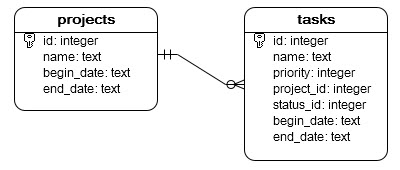
First, create a new function to establish a database connection to an SQLite database specified by the database file.
def create_connection(db_file):
   # create a database connection to the SQLite database
   # specified by db_file
   # :param db_file: database file
   # :return: Connection object or None

    conn = None
    try:
        conn = sqlite3.connect(db_file)
    except Error as e:
        print(e)

    return conn
Next, develop a function to insert a new project into the projects table.
def create_project(conn, project):

    # Create a new project into the projects table
    # :param conn:
    # :param project:
    # :return: project id

    sql = ''' INSERT INTO projects(name,begin_date,end_date)
              VALUES(?,?,?) '''
    cur = conn.cursor()
    cur.execute(sql, project)
    conn.commit()
    return cur.lastrowid
In this function, we used the lastrowid attribute of the Cursor object to get back the generated id.
Then, develop another function for inserting rows into the tasks table.
def create_task(conn, task):

    # Create a new task
    # :param conn:
    # :param task:
    # :return:

    sql = ''' INSERT INTO tasks(name,priority,status_id,project_id,begin_date,end_date)
              VALUES(?,?,?,?,?,?) '''
    cur = conn.cursor()
    cur.execute(sql, task)
    conn.commit()

    return cur.lastrowid
After that, develop the main() function that creates a new project and two tasks associated with the project.
def main():
    database = r"C:\sqlite\db\pythonsqlite.db"

    # create a database connection
    conn = create_connection(database)
    with conn:
        # create a new project
        project = ('Cool App with SQLite & Python', '2015-01-01', '2015-01-30');
        project_id = create_project(conn, project)

        # tasks
        task_1 = ('Analyze the requirements of the app', 1, 1, project_id, '2015-01-01', '2015-01-02')
        task_2 = ('Confirm with user about the top requirements', 1, 1, project_id, '2015-01-03', '2015-01-05')

        # create tasks
        create_task(conn, task_1)
        create_task(conn, task_2)
And call the main() function:
if __name__ == '__main__':
    main()
Here is the full program:
import sqlite3
from sqlite3 import Error


def create_connection(db_file):
    # create a database connection to the SQLite database
    # specified by db_file
    # :param db_file: database file
    # :return: Connection object or None

    conn = None
    try:
        conn = sqlite3.connect(db_file)
    except Error as e:
        print(e)

    return conn


def create_project(conn, project):

    # Create a new project into the projects table
    # :param conn:
    # :param project:
    # :return: project id

    sql = ''' INSERT INTO projects(name,begin_date,end_date)
              VALUES(?,?,?) '''
    cur = conn.cursor()
    cur.execute(sql, project)
    conn.commit()
    return cur.lastrowid


def create_task(conn, task):

    # Create a new task
    # :param conn:
    # :param task:
    # :return:

    sql = ''' INSERT INTO tasks(name,priority,status_id,project_id,begin_date,end_date)
              VALUES(?,?,?,?,?,?) '''
    cur = conn.cursor()
    cur.execute(sql, task)
    conn.commit()
    return cur.lastrowid


def main():
    database = r"C:\sqlite\db\pythonsqlite.db"

    # create a database connection
    conn = create_connection(database)
    with conn:
        # create a new project
        project = ('Cool App with SQLite & Python', '2015-01-01', '2015-01-30');
        project_id = create_project(conn, project)

        # tasks
        task_1 = ('Analyze the requirements of the app', 1, 1, project_id, '2015-01-01', '2015-01-02')
        task_2 = ('Confirm with user about the top requirements', 1, 1, project_id, '2015-01-03', '2015-01-05')

        # create tasks
        create_task(conn, task_1)
        create_task(conn, task_2)


if __name__ == '__main__':
    main()
Code language: Python (python)
Finally, connect to the database via sqlite3 shell and query data from the projects and tasks tables to check if the data has been inserted successfully. Open a command prompt or terminal as depicted below:

Use these commands to format the output:
sqlite> .header on
sqlite> .mode column
And use this SELECT statement to query data from the projects table:
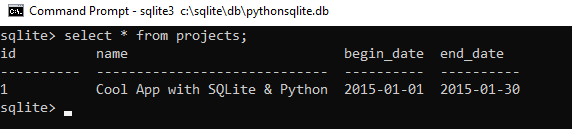
And use the following SELECT statement to query data from the tasks table:
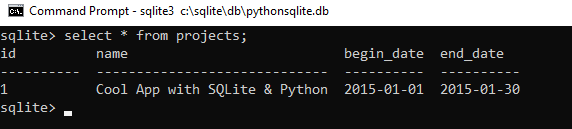
In this tutorial, you have learned how to insert rows into tables in the SQLite database from a Python program.
Reference: SQLite Tutorials